
Data Documentation for the National Forensic Laboratory Information Systems (NFLIS) Drug Chemistry Data
This document outlines the process for acquiring drug chemistry data from the U.S. Drug Enforcement Administration’s (DEA) National Forensic Laboratory Information System (NFLIS) program’s NFLIS-Drug dataset. It details the approach of the Southern Regional Drug Data Research Centers (SR-DDRC, or just DDRC) to extracting, transforming, and loading (ETL) the data into Microsoft SQL Server, as well as the creation of the dataset’s data dictionary. This guide is intended for data analysts and researchers interested in replicating the SR-DDRC’s process or using the data acquired by the SR-DDRC.
1. Overview of the National Forensic Laboratory Information Systems (NFLIS)
The National Forensic Laboratory Information Systems (NFLIS) is a program managed by the Diversion Control Division within the U.S. Drug Enforcement Administration’s (DEA). NFLIS was designed to collect and analyze drug chemistry and toxicology results from participating federal, state, and local forensic laboratories.
The NFLIS program began in 1997 with the collection of drug analysis data solely from local, state, and federal forensic laboratories. In 2019, it expanded to include data from public and private toxicology laboratories and medical examiner offices, enhancing the program's comprehensiveness. The NFLIS’s Public Data Query System (DQS) captures nearly all drug chemistry cases nationwide.
1.1 NFLIS’s Public Data Query System (DQS)
Users can stratify NFLIS’s DQS database for drug chemistry data (NFLIS-Drug) using various criteria, such as time (e.g., year, period), location (e.g., nationwide, region, state), and substance (e.g., categories, specific drugs). The system generates aggregates, provides summaries, allows for data pivots, and supports visualization within the platform. Users can also export and save their queries for future use.
2. NFLIS-Drug Dataset
The NFLIS-Drug dataset features drug chemistry data submitted by participating laboratories. Information on NFLIS’s participating laboratories is publicly available through DEA publications.
2.1 Data Use Guidelines and Confidentiality Standards
Access to the NFLIS Public DQS requires user registration. Upon completing registration and accepting the NFLIS terms and conditions, users can query the NFLIS-Drug data.
2.2 NFLIS’s Substances
NFLIS publishes a document listing select substances from the NFLIS-Drug dataset. This document is not exhaustive, and new substances are added regularly. It includes information such as substance name, synonyms, chemical name, formula, category, and date added. More details are available on the NFLIS’s Substances page.
3. NFLIS Query Process
This section describes NFLIS’s Public DQS query system and the SR-DDRC's process for querying NFLIS Publix DQS’s NFLIS-Drug dataset.
3.1 Query System Functionality
NFLIS’s Public DQS requires user registration. Once registered, users can access the system, save queries, download CSV extracts, and pivot tables. These features allow users to revisit their queries or explore the data within DQS. For more details, refer to NFLIS’s “NFLIS-Drug Public Data Query System Quick Reference Guide”.
3.2 SR-DDRC Query Procedure
The SR-DDRC queried the NFLIS-Drug dataset available via NFLIS’s Public DQS to acquire data on drug chemistry for the 17 SR-DDRC states, spanning the years 2010 to Most Recent.
The following selections were used in the query:
-
Select Analysis Type
- The default option of “Base Drugs List” was retained.
-
Select Aggregation
- The default option of “Annual” was retained.
-
Select Data Type
- Only one (1) option is available – “Submission Date”
-
Select Date Range
- Start Date: 2010
- End Date: Select Most Recent Year
-
Select Location
- “State” was selected.
-
Select Drugs for the Base Drug List Query
- “Select All” was used to select all drug categories
- “Show Synonyms” was clicked
For more information about the query system and process, refer to the “NFLIS-Drug Public Data Query System Quick Reference Guide”.
3.3 NFLIS-Drug Query Results File
The NFLIS DQS allows query results to be exported in three (3) ways “CSV Raw Data Export”, “Excel Export”, and “CSV Export”.
- CSV Raw Data Export: Allows user to download the raw data set returned by the query in CSV format.
- Excel and CSV Export: Allows user to download custom formatted tables made using the “Pivot Grid” as an Excel or CSV file.
For more information, refer to the “NFLIS-Drug Public Data Query System Quick Reference Guide”.
4. ETL Process
The Extract, Transform, Load (ETL) process is essential for preparing and integrating data from NFLIS into a relational database. This section outlines the steps used by the SR-DDRC. The following instructions assume a basic proficiency with the syntax and structure of the programming language(s) used.
4.1 NFLIS-Drug Query Results File
The NFLIS-Drug data was exported as a single CSV file for the queried period using the "CSV Raw Data Export" option. This file format required minimal changes before importing the data into a relational database.
4.2 Data Transformation and Integration
This section outlines the systematic approach employed to transform and integrate raw data files into a structured format suitable for analysis within the SR-DDRC data repository. It details the steps taken to ensure data quality, including the removal of unnecessary elements, the standardization of data formats, and the loading of processed files into staging tables. The procedures described herein facilitate the accurate and efficient transfer of data from staging to production tables, thereby supporting subsequent analytical efforts.
4.2.1 File Inspection and Initial Modifications
The data transformation and integration process begins with inspecting the downloaded files from NFLIS using Notepad++. This inspection aims to identify necessary changes to standardize the files for loading into the SR-DDRC data repository.
By opening the file in Notepad++ and enabling the "Show All Characters" option (see Image 1 below), we see the results below:
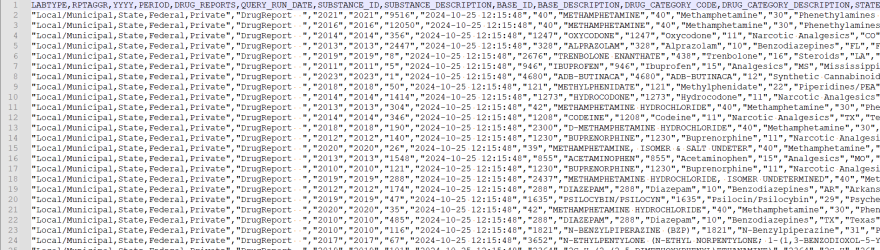
Image 1: This image illustrates the formatting of the text file exported from NFLIS DQS.
As seen in Image 1, the file is a Comma Separate Values (CSV) file with a header row. In the data rows, all text fields are enclosed in double quotes. While we generally prefer pipe delimited files, we can work with this file with minimum changes to the import process.
Since all data is contained in one file, we don’t need to worry about creating an iterative process to process a list of files or folders. We can simply copy this file to our database server and begin our import process. We will utilize SQL Server’s BULK INSERT functionality to import the files into the database.
4.2.2 Staging Table Setup and Data Loading
As detailed in our SR-DDRC Technical Framework document, our general process involves loading the entire raw file into a staging table before performing final cleaning and transformation prior to writing to the final production table.
The next step is to copy the processed file to a location accessible by our database server, either on the server itself or on a network share with read access. To facilitate this, a staging table is created in the staging database. In the staging table, all variables from the original files are added to their respective columns and are designated as “varchar” (varying character) for their SQL Server data type. This designation allows for the insertion of nearly any values into the table. For the NFLIS table, the following fields are needed:
- LabType
- RptAggr
- YYYY
- Period
- DrugReports
- QueryRunDate
- SubstanceID
- SubstanceDescription
- BaseID
- BaseDescription
- DrugCategoryCode
- DrugCategoryDescription
- State
- StateLongName
- StateFIPS
The SQL below was used to create the staging table:
CREATE TABLE [dbo].[YourStagingTableName](
	[LabType] [varchar](1000) NULL,
	[RptAggr] [varchar](1000) NULL,
	[YYYY] [varchar](1000) NULL,
	[Period] [varchar](1000) NULL,
	[DrugReports] [varchar](1000) NULL,
	[QueryRunDate] [varchar](1000) NULL,
	[SubstanceID] [varchar](1000) NULL,
	[SubstanceDescription] [varchar](1000) NULL,
	[BaseID] [varchar](1000) NULL,
	[BaseDescription] [varchar](1000) NULL,
	[DrugCategoryCode] [varchar](1000) NULL,
	[DrugCategoryDescription] [varchar](1000) NULL,
	[State] [varchar](1000) NULL,
	[StateLongName] [varchar](1000) NULL,
	[StateFIPS] [varchar](1000) NULL
)
Once the staging table is established, SQL Server’s BULK INSERT statement is employed to transfer the data from the .csv file to the staging database table. A sample of this command is:
BULK INSERT [dbo].[YourStagingTableName]
FROM ‘Full path to your file in single quotes' --Filepath here
WITH (FORMAT='CSV',
	FIRSTROW = 2, --the first row is a header row, so start with row 2
	FIELDTERMINATOR = ',', --we are using commas to separate fields
	FIELDQUOTE = '"', --text fields are enclosed in double quotes;
		--commas between double quotes are not interpreted as field separators
	ROWTERMINATOR ='0x0a' –hex value of Windows row termintator characters
		--ERRORFILE = '' --file path to .log file to hold errors
	)
 )
The final step in our process involves transferring data from the staging table to the production table. A production table must be created to store the finalized data, which can be achieved using the CREATE TABLE statement:
CREATE TABLE [dbo].[NFLISDrugDQS](
	[LabType] [varchar](100) NULL,
	[RptAggr] [varchar](100) NULL,
	[YYYY] [varchar](10) NOT NULL,
	[Period] [varchar](1000) NULL,
	[DrugReports] [varchar](1000) NULL,
	[QueryRunDate] [datetime] NULL,
	[SubstanceID] [varchar](10) NOT NULL,
	[SubstanceDescription] [varchar](500) NULL,
	[BaseID] [varchar](100) NULL,
	[BaseDescription] [varchar](500) NULL,
	[DrugCategoryCode] [varchar](10) NULL,
	[DrugCategoryDescription] [varchar](500) NULL,
	[State] [varchar](2) NULL,
	[StateLongName] [varchar](50) NULL,
	[StateFIPS] [varchar](2) NOT NULL,
	[Source] [varchar](100) NULL,
	[RecordCreatedDate] [datetime] NULL,
CONSTRAINT [PK_NFLISDrugDQS] PRIMARY KEY CLUSTERED
(	[YYYY] ASC,
	[SubstanceID] ASC,
	[StateFIPS] ASC)
)
The CONSTRAINT option defines a primary key for the table, with the YYYY, SubstanceID and StateFIPS comprising the primary key.
Fields are assigned different data types depending on the nature of the data. The Population field is created with an integer (Int) data type, while other fields retain the varchar type. The DrugReports field should always contain integer values; however, we will leave it as varchar in case any rows have a value such as ‘N/A’. We can always convert the value to an integer when the data is extracted for analysis.
Additionally, the fields Source and RecordCreatedDate are included to document the origin of each data row and the timestamp for when the data was inserted into the database.
Now that our production table is created, we proceed to transfer the data from the staging table to the production table using a script similar to the following:
INSERT INTO [YourProductionDatabase].[dbo].[YourProductionTable]
SELECT TRIM([LabType])
	  ,TRIM([RptAggr])
	  ,TRIM([YYYY])
	  ,TRIM([Period])
	  ,TRIM([DrugReports])
	  ,TRY_CONVERT(datetime,TRIM([QueryRunDate])) as 'QueryRunDate'
	  ,TRIM([SubstanceID])
	  ,TRIM([SubstanceDescription])
	  ,TRIM([BaseID])
	  ,TRIM([BaseDescription])
	  ,TRIM([DrugCategoryCode])
	  ,TRIM([DrugCategoryDescription])
	  ,TRIM([State])
	  ,TRIM([StateLongName])
	  ,TRIM([StateFIPS])
	  ,'FileNameHere' as 'Source'
	  ,GETDATE() as 'RecordCreatedDate'
FROM [YourStagingDatabase].[dbo].[YourStagingTable]
As indicated in the code above, subsequent modifications were implemented during the transfer of data tables from the staging table to the production table. Specifically, each field was wrapped with the TRIM function to ensure that any leading or trailing spaces are removed from the values. We documented the filename from which the data originated as the Source and employed the SQL Server GETDATE() function to capture the current date and time, allowing us to track when each record was created.
Upon successful completion of this process, a final table containing NFLIS data is established in a relational database, which can then be utilized to connect to data visualization or other software applications.
5. DDRC Data Dictionary
The SR-DDRC used information NFLIS’s document “NFLIS-Drug Public Data Query System Quick Reference Guide” to create the data dictionary for the exported files.
We recommend that users still review and reference documentation provided by NFLIS for the most detailed and up-to-date information.
Please refer to the data dictionary for variable definitions and possible values.
If you have additional questions about this dataset, please contact us at info@srddrc.com